
ASUS PRIME X570-P Guide: Features, Specs & Performance
The ASUS PRIME X570-P is a solid ATX motherboard for AMD Ryzen users who want PCIe 4.0 support without breaking the bank. It packs a strong power delivery system, dual M.2 slots, and a clean UEFI BIOS. Here’s what you need to know before buying and building with it.
Key Specifications and Features of the ASUS PRIME X570-P
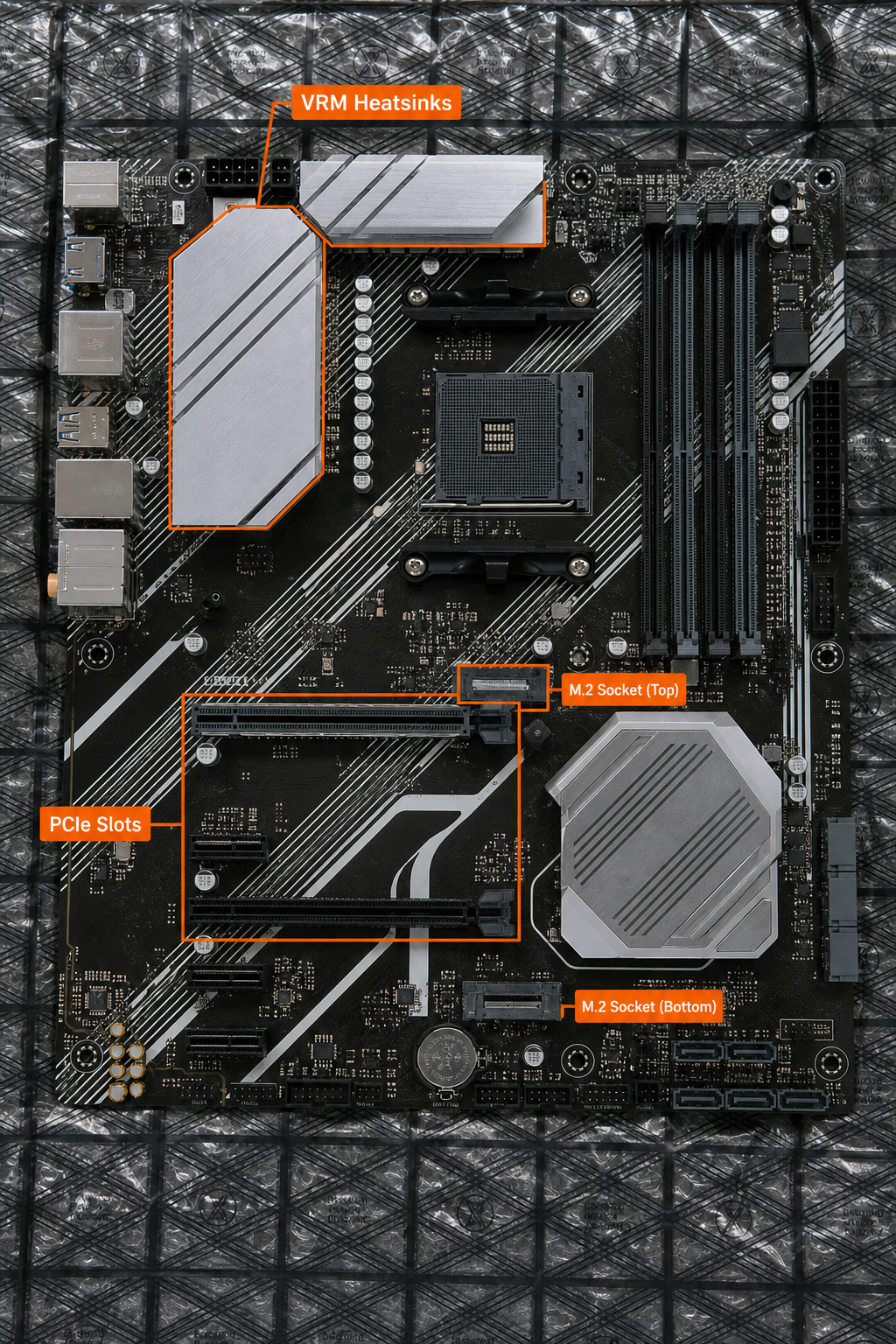
The PRIME X570-P uses the AMD X570 chipset with an active heatsink to keep the chipset cool. It supports AMD Ryzen 2000, 3000, 4000 G-Series, and 5000 series processors on the AM4 socket. The VRM is an 8+4 power stage design with DrMOS, which handles high-core-count CPUs like the Ryzen 9 3950X without thermal issues. Four DIMM slots support up to 128GB of DDR4 memory, with overclocking support up to 5100 MHz (depending on the CPU).
It also includes Aura Sync RGB headers and an addressable Gen 2 header for lighting customization. The board features ASUS SafeSlot Core and LANGuard for durability and surge protection. You can find the CSM version of this board at 99deals.in, which includes additional commercial management features.
According to ASUS official specs, the board supports ECC memory (dependent on CPU) and AMD CrossFireX.
Performance and Benchmarking: Operational Results
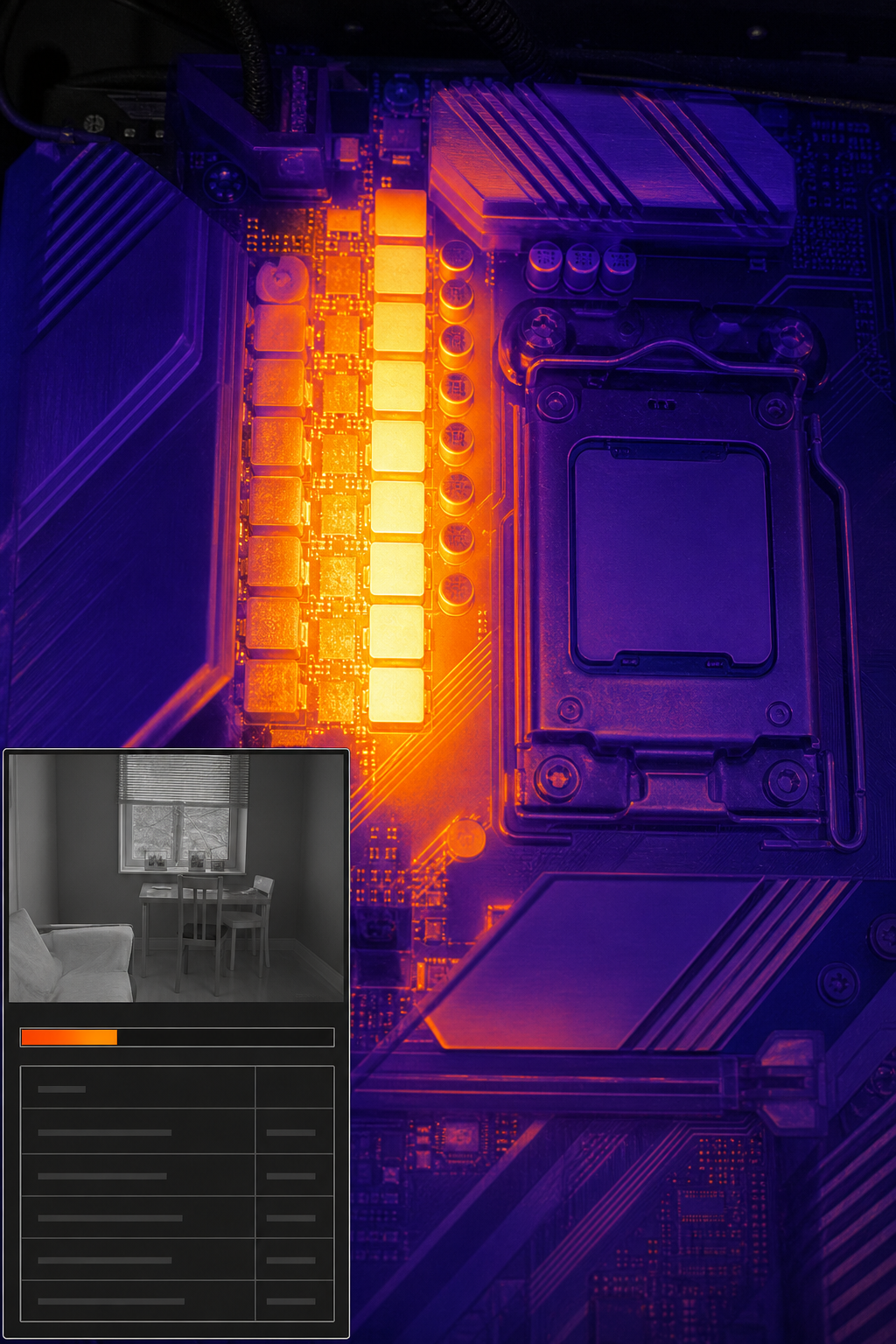
The PRIME X570-P’s VRM is capable of handling a Ryzen 9 5950X at stock settings without throttling. In multi-core benchmarks like Cinebench R23, scores are on par with more expensive X570 boards because the VRM doesn’t bottleneck the CPU. Memory overclocking is reliable thanks to ASUS OptiMem, which uses trace layout optimizations to boost frequencies. Users can often reach DDR4-3800 CL16 with a Ryzen 5000 CPU, matching the sweet spot for Infinity Fabric.
PCIe 4.0 support on the first M.2 slot and primary PCIe x16 slot gives a operational advantage for fast SSDs like the Samsung 980 Pro, reducing game load times dramatically. The active chipset heatsink keeps the X570 chipset under 60°C even with multiple PCIe 4.0 devices. For day-to-day tasks, the board’s audio solution (Realtek S1200A) provides clean sound with 108dB SNR, making it suitable for moderate audio work.
One limitation: the second PCIe x16 slot runs at PCIe 3.0 x8 when the primary is occupied, so don’t expect full 4.0 bandwidth for dual GPUs. But for single GPU setups, this is fine. The board’s performance is a strong argument for its value, and you can purchase it at 99deals.in with competitive pricing.
Compatibility: CPUs, RAM, and GPUs That Work Best
The PRIME X570-P supports a wide range of AMD Ryzen processors. For peak performance, a Ryzen 5000 series CPU like the 5600X or 5800X is ideal. Ryzen 3000 chips also work well. For gaming, pairing it with an RTX 3060 Ti or RX 6700 XT is a balanced match. Memory compatibility is broad: according to Pangoly’s compatibility list, common kits like G.Skill Trident Z and Corsair Vengeance are confirmed to work. Always check the QVL for the exact model to avoid boot issues.
GPU-wise, the primary slot runs at PCIe 4.0 x16, which is future-proof for current graphics cards. The secondary slot is PCIe 3.0 x4, suitable for a capture card or slower PCIe device. The board also has a COM port header for legacy peripherals, useful in industrial setups. If you’re building a home server or workstation, the six SATA ports are solid for storage arrays. For the best availability, check out the PRIME X570-P at 99deals.in.
Step-by-Step Installation Guide for the ASUS PRIME X570-P
Building a PC with this board is straightforward. Here are the steps:
Step 1: Prepare Your Workspace
Use an anti-static mat and wrist strap. Install the CPU first: lift the socket lever, align the triangle marker, and lower the lever. Then seat the RAM in DIMM_A2 and DIMM_B2 for dual-channel mode.
Step 2: Mount the Motherboard
Install the I/O shield first, then lower the board onto the standoffs. Secure with screws in a cross pattern. Connect the 8+4 pin CPU power and 24-pin ATX power.
Step 3: Add Storage and GPU
Install M.2 SSDs by removing the heatsink, inserting the drive at a 30-degree angle, and screwing it down. For the GPU, align it with the top PCIe x16 slot and push until it clicks. Connect SATA cables to the drives.
Step 4: Connect Front Panel and Fans
Attach the power switch, reset, and LED cables to the system panel header. Connect case fans to the CHA_FAN headers, and the CPU cooler to CPU_FAN. The board has a dedicated AIO_PUMP header for water cooling pumps.
Step 5: Power On and Test
Before closing the case, power on the system. If it posts, go into the BIOS to enable XMP for your RAM and set boot order. For detailed manual instructions, .
BIOS and Software: Making the Most of Your X570-P
The UEFI BIOS on the PRIME X570-P is well-organized. EZ Mode gives you an overview of CPU temperature, clock speed, and boot order, plus a one-click XMP button. Advanced Mode has a search function and fan tuning with Fan Xpert 4. You can also use AI Overclocking (available on some premium ASUS boards, but the PRIME series has AI OC Guide in BIOS) to auto-tune voltages and frequencies.
ASUS’s AI Overclocking microsite explains how the algorithm works: it profiles the CPU and cooling to suggest stable overclocks. For daily use, the EPU power-savings feature reduces power draw when idle. Armoury Crate software manages RGB lighting and driver updates. Make sure to install the latest BIOS from ASUS’s download page to fix bugs and improve memory compatibility.
Frequently Asked Questions
Does the ASUS PRIME X570-P support Ryzen 5000 series CPUs?
Yes, it supports Ryzen 5000 series CPUs with a BIOS update to version 2607 or later. The board is compatible out of the box with some earlier revisions, but check for a “Ryzen 5000 Ready” sticker on the box or update via USB flashback if needed.
How many M.2 slots does the PRIME X570-P have?
It has two M.2 slots. Both support PCIe 4.0 x4 and SATA modes. The first slot (M.2_1) is near the CPU, and the second (M.2_2) is below the chipset heatsink. The second slot also supports 22110 drives.
Can I use PCIe 4.0 graphics cards with this motherboard?
Yes, the top PCIe x16 slot is PCIe 4.0 compatible when using a Ryzen 3000 or 5000 series CPU. That means you get full bandwidth for modern GPUs like the RTX 3080 or RX 6800 XT.
Does the PRIME X570-P have built-in Wi-Fi?
No, the standard PRIME X570-P does not include onboard Wi-Fi. It has a Gigabit LAN port. You can add a PCIe Wi-Fi card or a USB Wi-Fi adapter if you need wireless connectivity.
What is the difference between PRIME X570-P and PRIME X570-P CSM?
The CSM (Corporate Stable Model) version includes additional hardware and firmware features tailored for business and commercial environments, such as enhanced stability and longer supply support. The core specs are the same. You can find the CSM model at 99deals.in.
Can I overclock my RAM on the PRIME X570-P?
Yes, you can enable XMP in the BIOS for rated speeds up to 5100 MHz. The board also allows manual overclocking via DRAM voltage and timings adjustments. Refer to the memory QVL on ASUS’s website for tested kits.
Conclusion
The ASUS PRIME X570-P delivers a strong set of features for its price point, with reliable performance on Ryzen CPUs and PCIe 4.0 support. If you’re building a gaming rig or a content creation workstation, this board is a solid choice. For the best purchase experience, head over to 99deals.in and grab the CSM version for added commercial stability.